The Virtual Picture Album
Compiled and distributed by the Less Commonly Taught Languages Project
The Story Behind the Virtual Picture Album
How to Access Items in the Virtual Picture Album
How to Submit Items for Inclusion in the Virtual Picture AlbumEducational use of these materials is allowed
The Story Behind the Virtual Picture Album
Language teachers know how useful drawings and photographs can be as teaching tools. Pictures provide visual support for all kinds of lessons, such as:
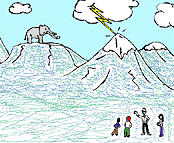
- introducing and practicing vocabulary for concepts or objects like 'lightning', 'mountains' and 'elephants' that typically aren't located in the classroom (and can't easily be be brought in);
- depicting situations and events where many things are going on at the same time;
- reinforcing and practicing particular grammatical constructions.
Additionally, pictures can:
- allow an instructor to design a balanced combination of passive and active activities and of group and individual work;
- stimulate students' imaginations and enthusiasm and encourage students' involvement in the course by adding another dimension to the learning skills and strategies students are able to use;
- provide an easy and fun way to introduce a wide array of cultural information to students--for example, to illustrate the kinds of houses people live in, the styles of dress usually worn, typical daily activities they engage in, etc.
While there are innumerable advantages to the use of pictures, it can be difficult and time-consuming to find a variety of pictures that are appropriate to build lessons around. This is particularly true for the LCTL teacher, who often has to work in isolation with limited resources, and therefore has no one with whom to share the effort and expense of such a task. Since one of the goals of the LCTL Project is to encourage the teaching and learning of LCTLs by making resources available on the Internet, we hit upon the idea of creating an extended online photo album or scrapbook which we call the "Virtual Picture Album".
 The Virtual
Picture Album (or VPA) is a computer archive of digitized photographs
and drawings, accompanied by useful descriptions and suggestions for ways
to incorporate these pictures into various in-class and out-of-class activities.
There is even a small collection of sample exercises using pictures from
the VPA, which you can use as is or modify for your own purposes. All
of the items in the VPA can be accessed from this website and can be downloaded
free of charge for educational purposes.
The Virtual
Picture Album (or VPA) is a computer archive of digitized photographs
and drawings, accompanied by useful descriptions and suggestions for ways
to incorporate these pictures into various in-class and out-of-class activities.
There is even a small collection of sample exercises using pictures from
the VPA, which you can use as is or modify for your own purposes. All
of the items in the VPA can be accessed from this website and can be downloaded
free of charge for educational purposes.
How to access items in the Virtual Picture Album
Virtual Picture Album Sections:
Downloading the pictures
Clicking on any thumbnail will link you to its full-sized counterpart along with a brief description and information about its use or suggested use. You can download the full-sized picture directly from your web browser by holding the cursor down on the photograph until a small options menu pops up, and saving this image onto your own computer.
The pictures are image files of type GIF (Graphics Interchange Format) or JPEG (Joint Photographic Experts Group), which means that they can easily be used in your own web pages, although they may not be usable in other applications without being reformatted.
Terms of Use
Using Instructional Materials
The LCTL project encourages and allows use of any of its teaching material free of charge for educational purposes. This includes the images in the VPA and sound clips in the VAVA, as well as material developed as part of the LCTL project's Minigrant program.
The project would appreciate knowing about its material use and acknowledgement of its source ("Used by permission of the LCTL Project / CARLA / University of Minnesota").